Watch our explainer video to the end to fully understand.
Android TV Box in Quebec — Turnkey 4K Streaming | NOMNOM.TV
The all-in-one Android box to centralize all your home entertainment, no contract, no hassle
With NOMNOM.TV, enjoy a high-performance Android TV box, designed to bring all your streaming apps together in one box. Movies, series, live TV, sports and much more — all in HD and 4K quality, delivered free of charge anywhere in Quebec.
Access thousands of channels from around the world in HD and 4K quality directly on your Android box.
A huge catalog updated regularly, available 24/7.
Don't miss any game, fight, or major sporting event, broadcast live on your TV.
What Our Customers Say
"We've been using it for 6 months, never had a problem. All Quebec channels in HD!"
— Marc T., Montreal"Super easy installation, support responds quickly. I recommend it to my whole family!"
— Sophie L., Quebec"Live sports are incredible. All Canadiens and NFL games, no complaints!"
— Jean-François B., Laval
Why NOMNOM.TV
Why choose the NOMNOM.TV Android box for your home
NOMNOM.TV is a reliable and fast Android TV box, ideal for those who want to centralize all their entertainment in one box. Compatible with all major streaming apps, simple to use, and ready to go right out of the box — anywhere in Quebec and Canada.
NOMNOM.TV Benefits
- Formuler Z Mini box, known for its stability and speed
- Simple installation (Plug & Play)
- 1 month of streaming offered with purchase
- Responsive customer service, available 7 days a week
- Compatible with all Wi-Fi connections
All-inclusive package
The most stable and fastest streaming package for Android boxes in Quebec
The NOMNOM.TV package gives you access to a complete entertainment offer, compatible with your Android TV box. All your subscriptions and streaming apps brought together in one turnkey box.
Included content
An impressive entertainment library
🎬 7,000+ movies (new releases, classics, Quebec content)
📺 2,500+ series (accessible via your popular apps)
🌍 3,500+ live TV channels
⚽ Live sports and special events
🎵 Music and themed channels
🎤 Comedy, documentaries, variety shows
Formuler Z Mini — The most powerful Android TV box in Canada
The Formuler Z Mini is an Android box known for its exceptional speed, wide compatibility with streaming applications, and daily reliability.
Enjoy a fluid experience with quick access to all your content, in high HD and 4K quality. Easy to use and ready in minutes, it’s the ideal solution to replace cable and centralize your home entertainment.
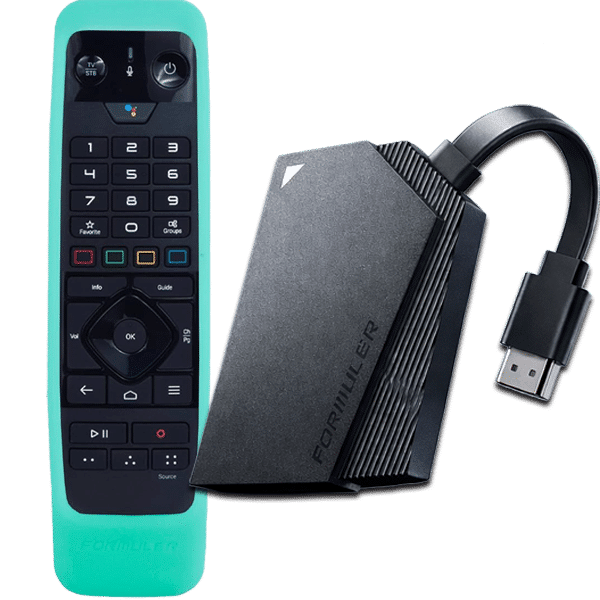
Benefits of the Formuler Z Mini box
- Smooth and responsive interface
- 4K UHD streaming
- Compatible with all your Android apps
- Plug & Play — ready in less than 5 minutes

An Android TV box you can take anywhere
Your Android box works on one TV at a time, but can be used wherever you go: at home, traveling, at friends’ houses, or at the cottage.
As long as there’s a Wi-Fi connection, your streaming package follows you.
Streaming package in Quebec — No contract, no commitment
The purchase of the box includes 1 month of free streaming. After this first month, you can re-subscribe in 6-month increments, with no contract and no commitment.
Package Benefits
- 6-month renewal: $125
- Secure credit card payment
- Simple and automatic reminder
Already have your Android box? Enter your name and email to enjoy a 24-hour free trial of unlimited streaming.
- Content access in less than 24h
- M3U format only (no MAC addresses)
Technical Support
Customer service available 24/7 across Canada
Need help with your Android box or streaming package? Our smart assistant is available at all times, 24/7, anywhere in Canada.
Our online chat is available to help you quickly. The MONTY chatbot is trained to answer your questions at any time, 24/7.
Submit a support ticket by email and our team will respond as soon as possible. Ideal for technical questions or inquiries related to your package.
Consult our Frequently Asked Questions to quickly find answers to the most common questions about the box, installation, and package.
F.A.Q.
Frequently Asked Questions
A: Delivery takes an average of 5 to 7 business days (maximum).
A: Yes, absolutely! You benefit from a 30-day satisfaction guarantee. If the product doesn't suit you, simply return it and we will refund the full cost of the box, except for the 1 month used ($21).
A: No. You must make your payment every 6 months. A reminder email will be sent to you 7 days and 48 hours before your service is cut off. In case of a cutoff, simply make your payment and the service will restart within 24 to 48 hours, with no reactivation fees.
A: Yes, it is possible. However, you cannot watch on two devices at the same time: only one access is allowed at once. This is why we advise against using it on multiple devices.
A: The box is shipped by mail within 48 hours of your order. Once received (maximum 5 to 7 business days), simply plug in the power cable and the HDMI cable, connect your Wi-Fi... and you're good to go!
A: If the payment is made on time after the reminder, your plan continues without interruption. If your service has been deactivated and you wish to reactivate your plan, allow 24 to 48 hours for reactivation.
A: We recommend a connection of at least 25 Mbps, whether via Wi-Fi or network cable. In some cases, the box can work with only 10 Mbps, but quality may vary.
If your connection cuts out or freezes often:
- Ensure you are connected to a stable 5GHz Wi-Fi network.
- Avoid thick walls between the router and the device.
- Restart your router and your Nomnomtv device.
You can also try connecting an Ethernet cable for better stability.
If no network is displayed:
- Check that your router is turned on.
- Make sure you are not too far from the router.
- Restart your device and try again.
- If the problem persists, perform a factory reset via Settings > Preferences > Reset.
A: No, not in Canada. However, in some countries where access may be limited, a VPN may be necessary to ensure the service works correctly.
A: From the MyTVOnline3 home menu, click on the remote (Home button). In the top right of the screen, a gear logo appears: if there is a red dot on it, it means one or more updates are pending. It is important to perform them by going to "Software Update" via the gear icon to ensure the box works at its full potential.
A: This likely means your internet connection is interrupted. Check that your Wi-Fi is enabled and connected.
A: At any time, simply press the Home button on the remote to return to the home menu of your Android box.
A: To restore the schedule, follow these steps:
1. From the home menu, go to MyTVOnline3.
2. On the remote, press the Menu button (the 3 horizontal lines to the right of the Home button).
3. Go to Content → Data Synchronization → EPG Data → Update EPG.
4. Then press the Back button several times (to the left of the Home button) to return to live TV.
A: To record, you must use a USB 3.0 flash drive (or newer). Plug it into the USB port on the side of the box, then follow the steps shown in this video tutorial: https://youtu.be/QpH9WcTODWg?si=YN6u1_ZiXtjveQ7k
https://youtube.com/playlist?list=PL1SsTffwqZZyggWekLeePb8Ph9iO7PoHaW&si=5RFHGLsCbyFsa70
A: You can reach us directly via the chat available at the bottom right of our website, or by email.
